Tickets & the Discord bot¶
kenny has a Discord bot you can add to your family's server. A family member mentions it, kenny opens a private thread and works the problem right there — diagnosing on that person's own PC, running the safe stuff itself, and asking you when something needs your say-so. Every thread is also a ticket: a record you can read, search and act on from the dashboard, whether it came from Discord, from you, or from an alert.
This page is the operator's guide to running that surface: what a ticket is, what kenny may do without asking, how the two enrollment paths work, and the Discord application setup you have to do yourself. Why it is built this way — the trust model, the four controls that make handing tool-use to a family member's chat message defensible — is covered in the ADRs, linked throughout; this page is about running it, not justifying it.
Consent and scope
This is for machines you administer, in a family setting, with the knowledge and consent of the people who use them. A Discord account only ever reaches the PCs you assign to the kenny account it is linked to — see Enrollment: linking a Discord account below.
What a ticket is, and where it comes from¶
A ticket is one support conversation: a title, a state, the one PC it is about, a running paraphrase of what happened, and a machine-readable trail of every message, tool call, approval and state change underneath it. Four things can open one:
- A Discord mention. Someone
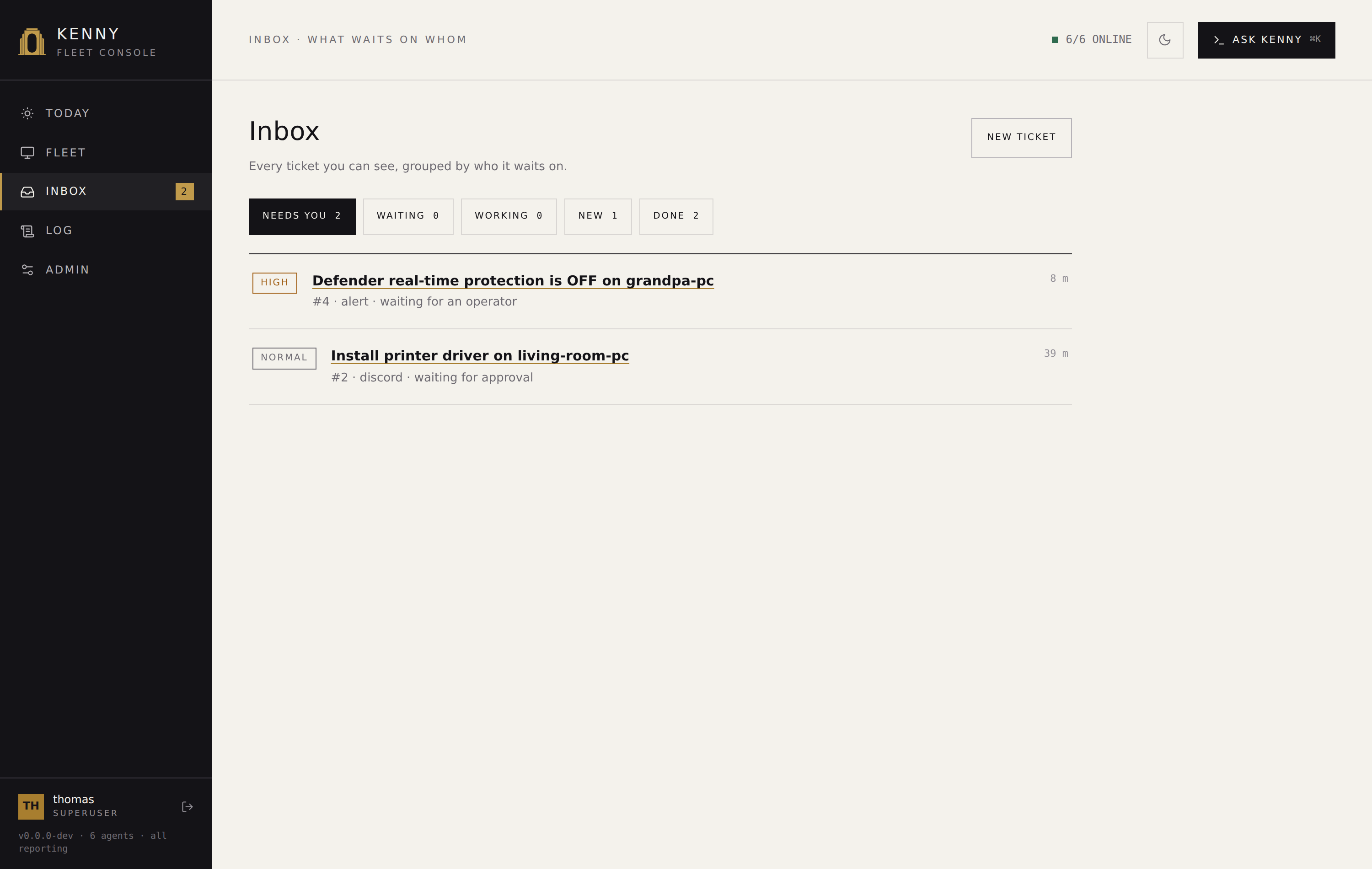
@kennys the bot in the support channel (or runs/help-me), kenny opens a private thread for it, and the ticket is born already pointed at that person's PC. If more than one PC could be meant, kenny asks first with a row of buttons and opens nothing until one is clicked — publicly, replying to the mention, or privately to the caller alone for/help-me— see Which PC a request is about. - The dashboard. Any signed-in account — including a scoped
user— can open a ticket with New ticket in the Inbox. This is the same record type, it just starts without a Discord thread attached. - An alert. A genuine alert (not a recovery, not the digest) can open its own ticket automatically, so a Defender-disabled or a failing-disk notification arrives with somewhere to work it, not just a push you have to remember. An alert-origin ticket has no requester — it belongs to the fleet, not a person — so only an operator can see or drive it. Which events do this is configurable — the auto-ticket rules in Admin → Alarm rules let you narrow it (e.g. stop offline PCs from opening tickets) or widen it (e.g. promote an inventory change, like a new local admin account, into one). See Alerting → which events open a ticket. While a ticket for the same subject is still open, a repeat alert is recorded on that ticket instead of opening a second one, and is readable there — see one open ticket per subject.
- An Ask kenny conversation. While you are investigating in the drawer, ask kenny to make a ticket out of it and it fills in the same form the Inbox's New ticket uses — title, description and host already written from what the conversation established. You correct it and press OPEN TICKET; nothing is filed until you do, and what gets filed is what is in the fields, not what kenny first wrote. The ticket records, separately, which read-only checks had already run in that conversation. Kenny can propose a ticket and look for one that is already open; it cannot start, block, resolve or reassign one — that happens on the ticket itself. See ADR-0063.
The Inbox is the queue of these tickets, and only of these tickets: every row there is a ticket, and every row opens its ticket. A standing critical or warning finding that no rule turned into a ticket is read on Fleet and Today instead.
The dashboard is not just where you read, note and close a ticket — a ticket has
its own chat with kenny, gated the same way Discord always was, so a ticket opened
without a Discord thread at all (or worked by an operator who isn't the requester) is just
as fully workable as one that came in over @kenny. It lives in the Ask kenny drawer,
bound to whichever ticket you have open. See
Ticket detail,
ADR-0050 and
ADR-0060.
Every ticket is pinned to exactly one PC, decided the moment it is created and never moved afterward — not by the requester, not by the assistant, and not by an operator either: there is no route, no button and no tool that retargets a ticket. That is deliberate: a ticket that could be quietly retargeted mid-conversation would undercut every other guarantee on this page, and a problem worth a ticket is a problem on one machine. If the wrong host was picked, cancel the ticket and open the right one. See ADR-0046 for why the ticket, not the chat thread, is the thing that actually exists.
The lifecycle, in plain language¶
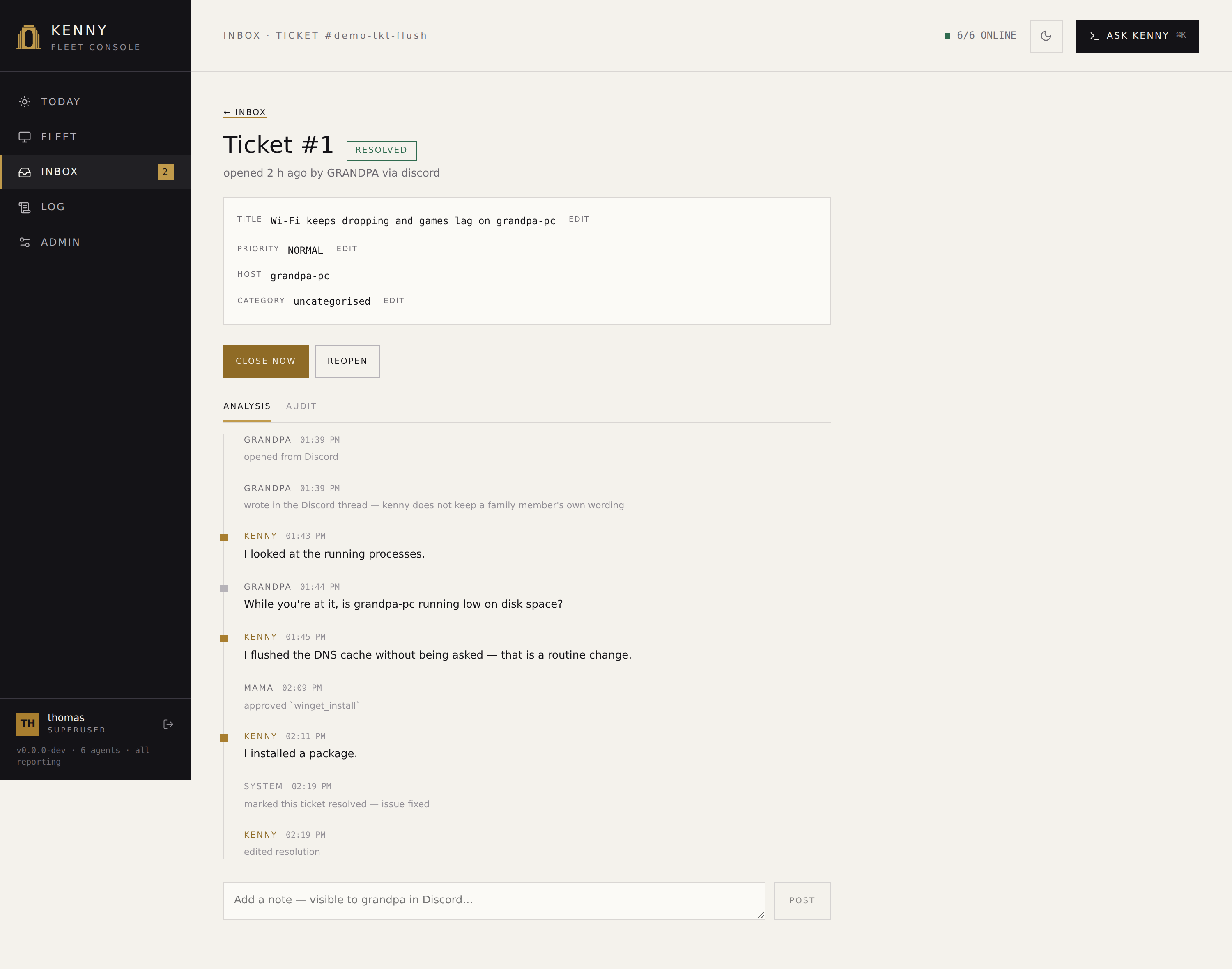
A ticket's lifecycle has two parts, shown together as one pill in the list and the detail view: where it is and, while it is being worked, who the ball is with.
Where it is — one of five states:
| State | Meaning |
|---|---|
new |
Just created, nothing has happened yet. |
in_progress |
Being worked — by kenny, by you, or currently blocked on someone (see below). |
resolved |
The problem is fixed. Still reopenable. |
closed |
Done. Terminal. |
cancelled |
Withdrawn, by the requester or an operator. Terminal. |
Who the ball is with, while in_progress — a ticket can be blocked on:
| Blocked on | Meaning |
|---|---|
| (none) | Actively being worked, nobody is waiting on anyone. |
user |
Kenny is waiting on a reply from the person the ticket belongs to. |
approval |
A step needs your sign-off before it can continue. |
operator |
Kenny has done what it can on its own and is waiting on an operator to pick it up (including once it hits its per-ticket turn limit). |
Nobody sets a block by hand. Kenny blocks a ticket when it asks the requester
something or opens an approval gate, and the housekeeping sweep blocks one on operator
when it escalates. What an operator can do is clear a block — when the answer reached you
in the kitchen rather than in Discord, or when you are picking up an escalated ticket. An
approval block is the exception on both sides: it ends with the decision or with the
gate's own timeout, never by someone declaring the wait over.
A ticket blocked on user or operator for a while gets one reminder
(KENNY_TICKET_STALL_NUDGE_SECS, default 2 days), and a user block still unanswered after
longer (KENNY_TICKET_STALL_GIVEUP_SECS, default 7 days) is re-blocked on operator — the
person it was waiting on did not answer, so a human needs to pick it up. approval never
gets nudged by this: it has its own clock, the approval TTL below.
A ticket nobody works is eventually dropped. If neither an operator nor the requester
touches a new or in_progress ticket for KENNY_TICKET_ABANDON_SECS (default 14 days),
the sweep cancels it and records why — the ticket reads "dropped, nobody worked on it"
rather than looking like somebody withdrew it, and the Discord thread is told in as many
words. This is the last rung of the same ladder: remind, escalate, give up. Only people
count — kenny working away on a ticket by itself does not keep it alive — and a ticket
sitting on an approval gate is never dropped this way, because that wait has its own
timeout and ending the ticket would deny a live request as a side effect. Set the value to
0 to switch it off.
A resolved ticket auto-closes after a while if nobody reopens it (KENNY_TICKET_AUTOCLOSE_SECS,
default 2 days) — a housekeeping sweep that runs alongside the alert and backup loops, not
anything the requester has to do. closed is final: reopening it is not possible, only the
resolved window before auto-close is the undo window.
These lifetimes — reminder, escalation, drop, auto-close — like the approval TTL below and transcript retention, are set in Admin → Tickets or in the environment; a value saved in Admin wins.
An operator can call a ticket resolved from new or in_progress — including one
blocked on approval (a duplicate, or something that fixed itself before kenny got to it).
Resolving one that is still sitting on a pending approval request denies that request
rather than leaving it open: the sign-off is no longer meaningful once the ticket itself is
done. The requester can cancel their own ticket from new or in_progress at any time
(withdrawing it), and close it themselves once it is resolved.
What kenny may do on its own, and what waits for you¶
Every tool kenny can call is one of three tiers — see Tool reference for the
full breakdown. On the ticket's own chat — whether it's reached over Discord or from the
ticket detail view in the dashboard — the rules below apply identically: the same
TicketPolicy gate drives both, it just has two transports now. Whoever is typing on a
given turn (the ticket's own requester, or an operator working someone else's ticket from
the dashboard) decides which host-scope/capability-profile applies to that turn, but never
which host it targets — the target PC stays exactly as frozen as it always was:
- Read-only tools (looking at telemetry, listing processes, checking service status) run immediately.
- Standard changes — routine, reversible, low-blast-radius steps like flushing DNS or opening a remote-help session — run autonomously, with a trail row recording that they ran and why they were allowed to.
- Normal changes — everything else that changes state: running a shell command, installing or removing software, touching who may sign in to a PC — always stop and wait for an operator, no matter who is asking or what PC it is on.
This is a property of the ticket's chat, not of the tools themselves. Talking about a ticket in the dashboard happens in the Ask kenny drawer, which binds to the ticket you have open and says so in its scope chip — that is the surface these rules apply to. The same drawer on any other page is the global assistant, tied to no ticket, and it still confirms both change tiers exactly as it always has. One panel, two contexts, and the chip is how you tell which one is in force. See Tool reference § the confirm-gate for the surface-by-surface table, ADR-0045 for why the tier and the gate are kept apart on purpose, and ADR-0050 for why the ticket detail view qualifies for the same autonomy Discord always had.
When a step needs you, kenny posts an approval card — in the operator channel if you
configured one, otherwise in the ticket's own thread — with the exact tool and arguments.
The Inbox says which ticket is waiting for one and the header's
Inbox badge counts it from anywhere in the dashboard. Approvals are persistent:
they survive a server restart, and they expire after KENNY_TICKET_APPROVAL_TTL_SECS
(default 24 h) — an expiry counts as a denial, and kenny tells the requester so.
In the dashboard a gate is answered in the Ask kenny drawer, the one place kenny asks for anything, and answering it carries the conversation on from where the gate stopped it (see Ticket detail). Wherever it is answered, the card being decided carries the exact tool and its frozen arguments: a confirmation shown without the call it confirms is a decision made without its evidence, and that rule is what fixes how a gate may be presented, not which screen presents it.
kenny looks first, before you are asked to¶
A ticket used to be a question put to you. Most of them did not need your judgement — they needed somebody to go and check. So kenny now does that first, unprompted: the moment a ticket is created, it runs one read-only investigation on that ticket's PC and writes what it found into the ticket, before you ever open it.
The point is that the raw signal often cannot answer the question it raises. A Windows
event reading "bad block on device \Device\Harddisk1" is alarming by every measure —
new, high volume, disk-related — and means nothing at all if that PC has no Harddisk1.
Whether it does is not in the event. It is only on the machine.
What an investigation may do is deliberately small:
- Read-only tools only, and not even all of them: nothing that looks at somebody's screen, reads their files, or lists the sites they visited. Those need the person's consent, and nobody is present in an investigation to give it. Everything that changes a PC is simply not available to it.
- One PC — the one the ticket is about, frozen when the ticket was created.
- A bounded number of steps (
KENNY_TRIAGE_MAX_ITERATIONS, default 8). An investigation that runs out does not guess: it produces no verdict, and the ticket stays open with whatever it did find.
It ends with a verdict, shown as what it means rather than as the word the server files it under: NO PROBLEM FOUND (the report names something that is not on this PC), KNOWN AND HARMLESS (real but harmless, confirmed), ALREADY OVER, NEEDS ACTION (a real problem — this always stays open for you), or UNCLEAR (it could not tell, and says what was missing). On a recurring reliability pattern it may also suggest a suppression rule — a suggestion only; creating one stays yours.
Letting kenny close what it checked¶
Off by default. With Let triage resolve a ticket (KENNY_TRIAGE_RESOLVE, in
Admin → AI) on, kenny may set a ticket to resolved itself — but only when all three
hold:
- the verdict is one that can close anything (never actionable or inconclusive),
- a read-only check actually ran and actually succeeded on that ticket, and
- the ticket was opened by an alert, not by a person.
The second is the important one, and it is the server's own check, not kenny's word for it: a conclusion reached by reasoning alone cannot close a ticket, however confident it sounds. Only having looked can. How sure kenny says it is plays no part — a model's stated confidence is not a measurement, and it is exactly the thing a plausible-but-wrong answer would get right.
What you see¶
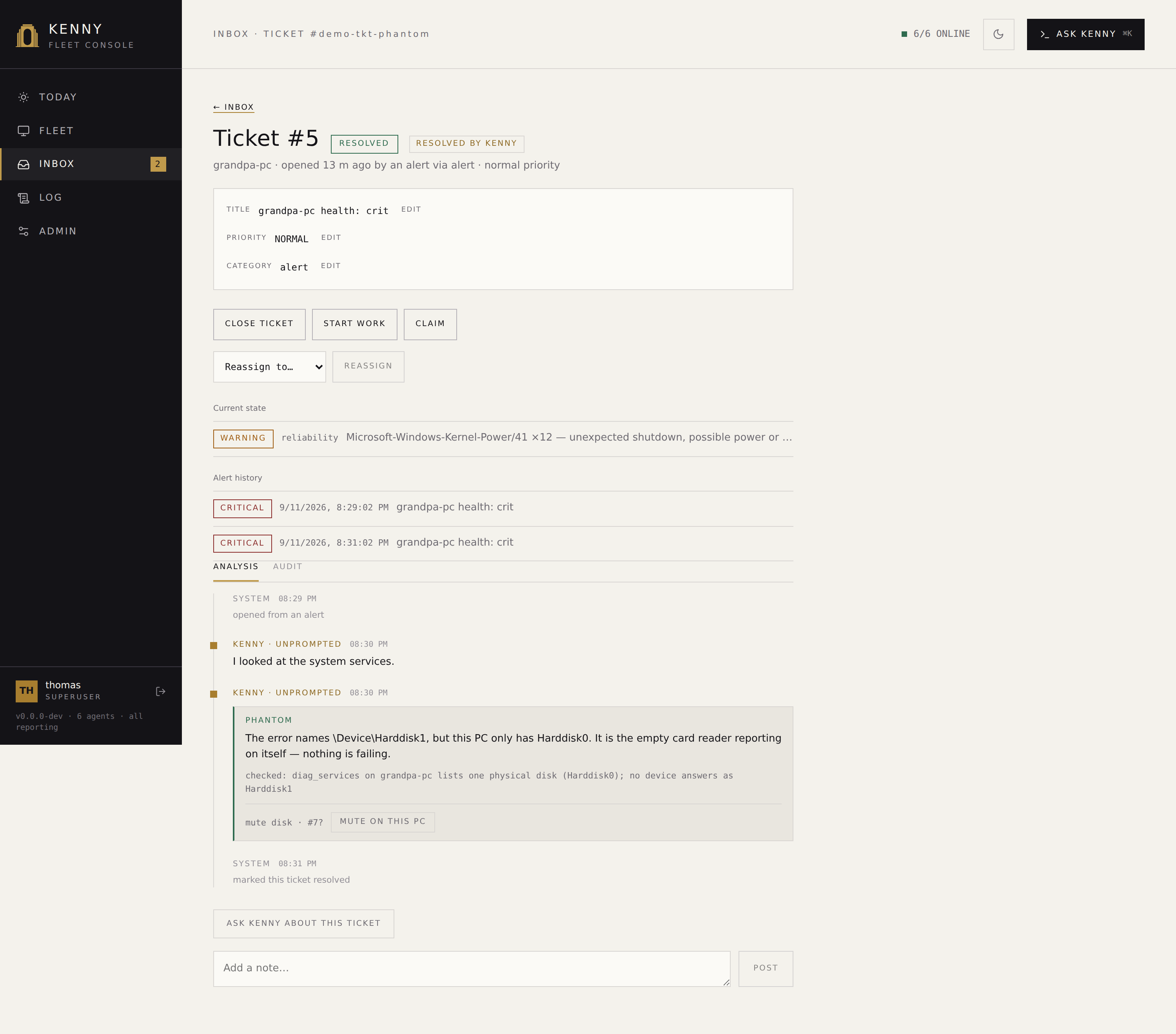
The verdict lands on the ticket's timeline as a framed row: the verdict word, kenny's one-sentence finding, and what it checked — the evidence sits with the verdict rather than behind a click, because it is the reason to believe it. A verdict the server declined to act on says why, which while the resolve switch is off is the most useful line on the page: it tells you what would have happened with it on.
A ticket kenny resolved itself carries a RESOLVED BY KENNY chip next to its status, and says so in the Inbox's DONE list too — so judging the hit rate is reading one list, not opening every ticket. The chip goes away as soon as anyone moves the ticket: it describes where the ticket stands now, not where it once did.
Where a verdict proposes muting a recurring event pattern, the row has a one-click button that creates that suppression rule for that PC. Host-scoped on purpose — the investigation looked at one machine and can only vouch for that one; widening a rule to the whole fleet stays a separate decision in the Reliability section.
Nothing is closed outright: resolved keeps the full reopen window
(KENNY_TICKET_AUTOCLOSE_SECS, default 2 days), and you or the requester can put it back
to in-progress at any point in it. The verdict, its evidence and the fact that kenny
decided are all on the ticket's timeline.
Leave the switch off to keep every verdict as a recommendation — the investigation still runs and still writes its findings, you just make the call. That is the sensible way to start: read a few weeks of verdicts, then decide whether they earn the switch.
Turn the whole thing off with Investigate new tickets automatically
(KENNY_TRIAGE_ENABLED) in Admin → AI; tickets then arrive uninvestigated. It also
stays off while the AI master switch there is off, and without an Anthropic API key or an
AI gateway (Admin → AI, or ANTHROPIC_API_KEY / ANTHROPIC_BASE_URL) — there is nothing
to investigate with.
See ADR-0056 for the reasoning and the three controls that bound it.
Operator approval vs. user consent — two different questions¶
A held step can be waiting on one of two different things, and they are not interchangeable:
- Operator approval asks "should the fleet change this way?" — the security question. Only you (operator or superuser) can grant it, and the requester can never approve their own ticket's step, however routine it looks.
- User consent asks "may kenny look at this person's screen, files, or browsing?" —
the privacy question, for
screen_capture,remotehelp_start,fs_readandweb_activity_query. Only the ticket's requester — the person it actually concerns — can grant it. You cannot grant it on their behalf, even as the operator: consent for someone else's privacy is not yours to give, and kenny refuses the attempt the same way it refuses a requester approving their own change.
If a single tool call needs both (opening remote help is a standard_change and
privacy-sensitive), consent is asked first; once it is answered, the call re-enters the
gate and — if it also needs an operator — asks for that next. A ticket only ever has one
open ask at a time. See ADR-0047 for consent as an axis
separate from authorization.
Enrollment: linking a Discord account¶
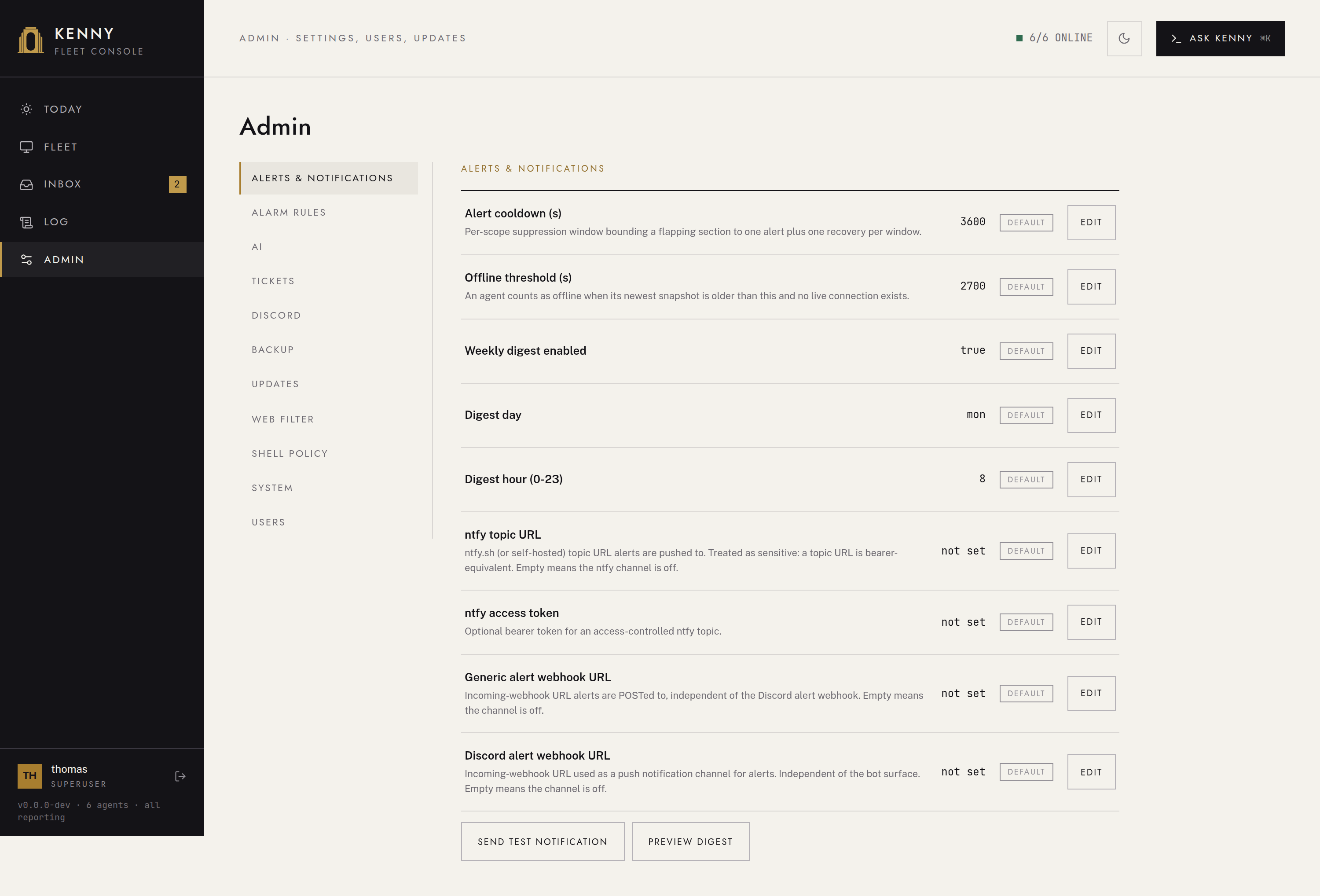
kenny only ever acts as the kenny account a Discord snowflake is mapped to — never from a display name, never from a Discord role. That mapping is what decides whose machines a person may ask about, so it is worth getting right. There are two ways to create it, both landing in the same table and both logged:
A — the person links themselves. They run /link in Discord. Kenny opens a
short-lived claim and hands back a code; you confirm it in Admin → Discord →
Pending claims, picking which kenny account it belongs to. The claim expires on its own
if nobody confirms it.
B — you link them directly. In Admin → Discord → Link manually, the guild-member picker lists everyone in the server (this needs the Guild Members intent — see below) and lets you bind one straight to a kenny account, no code required.
Either way, the person can check what kenny thinks of them with /whoami — their
kenny account, role, capability profile, and which PCs it can see. That command exists
specifically so a mis-mapping is visible to the person it affects, not silent.
An account can be unlinked at any time (Admin → Discord → Unlink on a linked row); a disabled/removed mapping makes that Discord user completely inert again — no ticket, no reply, no model call, exactly as if they had never linked.
A user can also see and remove their own binding, from their Profile — the raw Discord account id only, never a display name. Unlinking is self-service because it only ever takes privilege away; linking stays the two-path operator-confirmed process above, on purpose (ADR-0044).
Which PC a request is about¶
A ticket is about exactly one machine, and that machine is fixed before the ticket exists — nothing said afterwards can move it (ADR-0044, control 1). So "my PC is slow" has to be resolved to one host up front, and kenny never infers it from the wording.
Two things decide it, and they are not the same question:
- What the account may reach. A scoped
useraccount reaches only the hosts assigned to it. An operator or superuser reaches the whole fleet. - Which of those are its own. The host scope in Users → (a user) → Host scope, which for an operator limits nothing and instead names the machines it lives with.
An unqualified request goes to the second list. One host on it → the ticket opens straight
away. More than one → kenny posts one button per host and opens nothing until the asker
clicks. A bare mention gets a public card replying to it; /help-me gets the same
buttons back as its own private reply, wherever the command was typed — including inside
an existing ticket thread, so it never leaks into the public support channel. Only the
person who asked can answer, the click is good once, and the chosen host is re-checked
against their scope at click time — a card that has been sitting around since before an
assignment changed does not get to use the old answer.
Set the host scope for an operator too. Without it every bare mention from an operator account has to be answered with a question first, because reaching the whole fleet is indistinguishable from owning all of it.
/help-me host:<id> still names any host the account may reach, whether or not it
is one of its own — the shortlist steers the default, it does not shrink the reach.
Capability profiles¶
A capability profile is a named, per-account tool allowlist — it only ever narrows what an account's role would otherwise allow, never widens it. Set it per user in Users → (a user) → Capability profile.
| Profile | Roughly |
|---|---|
self-service-basic |
Diagnose your own PC, plus the standard changes (flush DNS, open remote help). No shell, no file reads, no browsing history, no account changes. |
power-user |
Also files, event log, screen captures, and package install/uninstall/update. Still no shell, no agent updates, no account governance. |
operator |
Unrestricted — today's behavior. |
| (none set) | Role default — the profile column is nullable on purpose. |
A profile applies everywhere that account acts — Discord and MCP alike — and it is checked twice: the disallowed tool is not even offered to the model, and dispatch refuses it again if it somehow got called anyway. See ADR-0047 for why this is a profile column rather than a fourth role.
What is recorded, and what is not¶
Every ticket keeps two things: a paraphrase — the running summary and resolution you read in the dashboard — and a machine-readable event trail: every message, tool call (with its arguments), approval, consent and state change, in order, timestamped and attributed. It is never pruned.
The trail is the audit, not the page. Ticket detail reads it two ways: Analysis, the
default, is what happened put into sentences — findings, what people wrote, what kenny
looked at and changed — and Audit is the trail itself, every row with the arguments
each call ran with. What the analysis view leaves out is machine bookkeeping (the
work started transition, the waiting for a reply block, a stall reminder) and the
individual read-only calls, which are condensed into one plain sentence naming what was
checked. Nothing is lost: every line in the analysis view knows which trail rows it stands
for, and a row it does not show is one the server named as bookkeeping — see
ADR-0060.
Whether a message row carries the actual wording depends on where it came from. A
message you type into the ticket's own chat in the dashboard, and every reply kenny sends —
whichever surface(s) it went out on — carries its verbatim text in the trail, so it survives
a restart and a raw-transcript prune and reads back exactly as written. A message from a
Discord thread still carries only a short summary, unchanged from before: the reasoning is
that a dashboard message (or an operator's own note) is curated work you chose to put on the
record, the same way an unbounded Ask kenny chat history already is, while a family member's
side of a Discord conversation is not something kenny needs to keep verbatim to operate the
system — kenny's own words are never a private conversation regardless of which door they
went out, so they are always kept in full. See
ADR-0050 for the full reasoning, which
amends ADR-0046 on this point. One
practical consequence: the trail was already never pruned, and it now grows with how much a
ticket's chat is actually used — there is still no knob to bound that.
Stored is not the same as shown. Kenny's replies live in the trail and are read in the Audit tab; what the ticket shows of a turn is a line kenny writes for it — one or two sentences saying what it found or changed — because the conversation itself is legible on the surface it was had on and the ticket is a record, not a second transcript of it (ADR-0061).
The raw transcript — the verbatim back-and-forth kenny needs only to resume a ticket
after a restart — is working state, not the record. It is pruned after
KENNY_TICKET_RETENTION_DAYS (default 30 days) once a ticket is closed. Nothing about the
ticket, its summary, or its audit trail depends on the transcript still existing; deleting
it loses nothing you would ever need to read back.
Screenshots, file contents, event-log text and browsing history never leave the server toward Discord — kenny summarises what it found in plain language and links to the ticket in the authenticated dashboard for the detail. Discord threads are private (invite the requester only) and slash commands answer ephemerally, but the output-redaction rule holds regardless of thread privacy. The same rule applies to the "also post in the Discord thread" checkbox in the dashboard's ticket chat: mirroring a reply to Discord is opt-in per message, off by default, and only offered when the ticket has a bound thread — and it goes through the same redaction a Discord-bound reply has always gone through, so checking it never lets anything reach Discord that couldn't already reach it before.
Lifecycle moves now reach the thread, too. Resolving, cancelling or closing a ticket from
the dashboard — and the auto-close sweeper doing the same — used to be silent in Discord: the
thread just sat there while the ticket itself moved on. It now posts a short message and, at
a terminal state, archives the thread, the same way the Discord-driven /close path always
has.
Setting up the Discord application¶
The bot needs its own Discord application — kenny cannot use Discord's own assistant ("Clyde" was retired at the end of 2024), and there is no shared kenny bot to add. This part is on you, once, in the Discord Developer Portal:
1. Create the application and its bot¶
Applications → New Application, name it (this name and its avatar are what the family sees — "kenny" and the dog mark keep it recognisable), then open the Bot tab and add a bot.
While you are on that tab, turn Public Bot off unless you have a reason not to. It only controls whether other people can invite your bot; leaving it on does not grant anyone access to your server, but there is no reason to advertise it.
2. The token¶
Bot → Token → Reset Token, then copy the value. Discord shows a bot token exactly once — there is no "reveal" later, so if you lose it you reset it again, and resetting immediately invalidates the previous one.
Put it in KENNY_DISCORD_BOT_TOKEN. This one is environment-only: it is never written
to kenny's database and never editable in the Admin UI, so rotating it means changing
the environment and restarting. A leaked bot token lets anyone act as your bot in your
server — treat it like the operator token.
3. Privileged intents¶
Still on the Bot tab, under Privileged Gateway Intents:
| Intent | Needed for | If missing |
|---|---|---|
| Message Content | Required. Reading what someone actually wrote. | Mentions arrive with empty content. kenny cannot tell what was asked and the bot looks dead. This exact symptom is detected and reported once in the operator channel and in /api/discord/status, so it does not read as a silent hang. |
| Server Members | The guild-member picker (enrollment path B). | The picker returns an empty list with a warning; enrollment path A (/link) still works. |
| Presence | nothing — leave it off. | — |
kenny asks for no other intent. Under 100 servers these are toggles; above that Discord requires verification, which a household install will never reach.
4. Bot permissions and the invite¶
Use OAuth2 → URL Generator rather than writing the URL by hand — it computes the permission bits for you.
Scopes: bot and applications.commands. The second one is easy to forget and is
what allows the slash commands to be registered; without it the bot joins and the
the slash commands never appear.
Bot permissions — check exactly these:
| Permission | Why |
|---|---|
| View Channels | See the support and operator channels at all |
| Send Messages | Reply, and post approval cards |
| Send Messages in Threads | Everything after a ticket is opened happens in a thread |
| Create Private Threads | A ticket thread is private by default (KENNY_DISCORD_PRIVATE_THREADS) |
| Manage Threads | Archive and lock a thread when its ticket closes |
| Read Message History | Read the thread it is working in |
| Embed Links | Approval cards are embeds |
Nothing else. kenny never posts files or images to Discord — screenshots, file contents and event-log text are deliberately kept on the server — so it needs no attachment permission, and it never moderates, so it needs no kick, ban or role permission. If you are tempted to grant Administrator to "make it work", don't: it will not fix a missing intent, which is the usual real cause.
Open the generated URL, pick your server, and authorise.
Channel overwrites can still block it. Server-level permissions are not the whole story — if the support or operator channel has its own permission overwrites, add the bot's role there too. A bot that can see the server but not the channel behaves exactly like one that was never invited.
5. Point kenny at the right places¶
Turn on User Settings → Advanced → Developer Mode, then right-click a server or channel and Copy ID to get the snowflakes for:
KENNY_DISCORD_GUILD_IDS— the server(s) kenny may react in. This is a hard allowlist and an empty one denies everywhere; there is no allow-all mode, on purpose. An event from any other guild is dropped before anything else happens, including before the author is looked up.KENNY_DISCORD_SUPPORT_CHANNEL_ID— where a mention opens a ticket.KENNY_DISCORD_OPERATOR_CHANNEL_ID— where approval cards go (the ticket thread otherwise).
Restrict the operator channel to yourself as good hygiene — but understand what that is and
is not. Deciding an approval requires the kenny operator role either way; channel
visibility governs who sees the card, not who may act on it. Discord roles are never read
as authorization (ADR-0044), so this
is defence in depth, not the control.
6. Switch it on¶
Set KENNY_DISCORD_ENABLED=1 (or turn on Discord bot enabled in Admin → Discord)
and restart. The bot connects on startup; nothing happens before that, and nothing happens
at all without a token.
Checking it actually worked¶
Admin → Discord shows the gateway status. Three things it will tell you:
- connected — the gateway is up.
- failed to start with a reason — most often the optional
discord.pydependency is missing from a source install (the published image ships it), or the token is rejected. - a Message Content warning — the intent is off; mentions are arriving empty.
Then mention the bot in the support channel. You should get a private thread. If nothing
happens at all, work down: is the account linked (/whoami), is the guild on the
allowlist, can the bot see the channel?
An unmapped Discord account is completely inert by design — no thread, no reply, not even a model call — so "the bot ignores me" is the expected behaviour before enrollment, not a fault.
A server with no Discord configuration at all still runs the full ticket surface — the
store, the lifecycle, the dashboard's Inbox and API all work with nothing pointed at
Discord; only the bot connection itself is opt-in. See setup.md for the
complete environment-variable reference and ADR-0044
for why Discord roles are never read as authorization, however tempting that shortcut looks.
See also¶
dashboard.md— the Inbox, its inline approval gates, and the Admin → Discord, Tickets and AI sections, widget by widget.tools.md— the three tool tiers and the full confirm-gate table.alerting.md— how an alert opens a ticket, how to configure which ones do, and the Discord webhook notification channel.- ADR-0044 — delegated identity, no parallel authorization.
- ADR-0045 — the tier belongs to the tool, the gate to the surface.
- ADR-0046 — the ticket is the entity; the chat thread is a binding.
- ADR-0047 — capability profiles as a third authorization axis.
- Alerting → which events open a ticket — operator-configurable auto-ticket rules.
- ADR-0050 — the ticket detail view as a second chat surface, verbatim trail wording, and the closed lifecycle-notification gap.
- ADR-0060 — why the ticket shows findings while the trail, complete and one tab away, stays the audit.