Tool reference
This page catalogs every tool kenny exposes to Claude — over MCP (a local client) and in
the Ask kenny overlay — and explains which ones can change a PC, who has to approve them, and
where each call is recorded. For the operator workflow around these tools, see
user-guide.md.
Two kinds of tools
kenny splits its tools into two families:
- Capability tools run on a single agent PC (Windows, Linux, or macOS). Every call names
its target with an
agent_idargument, forwards arequestframe to that agent through the tunnel, and returns the agent'sresponse.powershell_exec,shell_exec, thefs_*,winget_*,diag_*,net_*tools,screen_capture,remotehelp_*,telemetry_collect, andagent_updateare all capability tools.powershell_execandshell_execare OS-scoped mirrors of each other (Windows vs. Linux/macOS) — the server's OS guard (below) refuses to forward the wrong one for a given agent's OS. - Server-only orchestration tools read the registry, telemetry store, and health rules
on the server. They are never forwarded to an agent:
list_agents,select_agent,fleet_overview,agent_health,agent_snapshot,agent_availability(plus the server-side web-filter tools).
agent_id targeting, and what select_agent actually does now (ADR-0038)
A remote MCP client (Claude Desktop, claude.ai) gives the server no reliable
per-conversation identifier, so every capability tool call over MCP must include its
own agent_id naming the target host — there is no server-side "current agent" a raw
MCP call can rely on. select_agent still validates an id and is useful for discovery,
but it no longer routes anything; passing it once and then omitting agent_id on a later
call fails with an explicit no_agent error rather than guessing a host.
The Ask kenny overlay is the one place a sticky selection is still safe, because each
conversation is a genuinely separate, non-shared session: it forwards to whichever agent
is selected in the dashboard's context pill, and the model can pass agent_id to target
a different host for one call without changing that selection.
Windows-only capabilities stay green on Linux CI
Capability tools that touch Windows internals have portable fallbacks in the agent, so
cargo test / cargo build pass on Linux dev and CI. On a non-Windows host the
affected tools return error.code = "unsupported" rather than failing the build. This
is the agent's #[cfg(windows)] discipline.
Three tiers, and who enforces what
Every tool is classified into one of three tiers (kenny_server/tool_classes.py, the
single source of truth):
read_only— observes; changes nothing on the host or on the server.standard_change— a change that is routine, reversible and low-blast-radius: flushing a DNS cache, opening a remote-help session, updating an already-installed package, pushing a block list that is already configured.normal_change— everything else that changes state: arbitrary code execution, installing/uninstalling software, who may sign in to a family PC, changing what the server itself enforces. Unknown tools fail closed into this tier.
The tier is a property of the tool. The gate is a property of the calling surface. A tier is never permission to skip a confirmation — it only says how consequential a change is. Whether that consequence gets confirmed, runs autonomously, or is refused outright is decided independently by whichever surface is calling: today the Ask kenny overlay and MCP, and — for the Discord ticket surface described in ITSM & the Discord bot — a per-tier autonomy split.
| Tier | Dashboard chat | MCP | Ticket chat (see itsm.md) |
Triage |
|---|---|---|---|---|
read_only |
runs | runs | runs (a consent hold first, for a privacy-sensitive one) | runs — but the privacy-sensitive ones are withheld entirely |
standard_change |
holds (confirm-gate) | runs | runs autonomously, with a trail row | same, and only ticket_triage_verdict is on offer |
normal_change |
holds (confirm-gate) | runs | holds for an operator's approval | withheld entirely |
The triage column is the one surface that withholds rather than gates, and the reason is that it is the one surface with nobody in it: an unprompted investigation has no operator to answer an approval and no person to give consent, so a hold would park the ticket forever. A tool absent from its schemas is never a call to hold. See ADR-0056.
The Ask kenny overlay holds both change tiers, exactly as it always has — moving a tool
from normal_change to standard_change changes its blast-radius classification, never
whether the dashboard confirms it. Only the Discord ticket surface treats
standard_change as safe to run on its own, and it still records a trail row saying so.
See ADR-0045 for why the tier and the gate are
kept apart, and ADR-0009 for the dashboard
confirm-gate this refines.
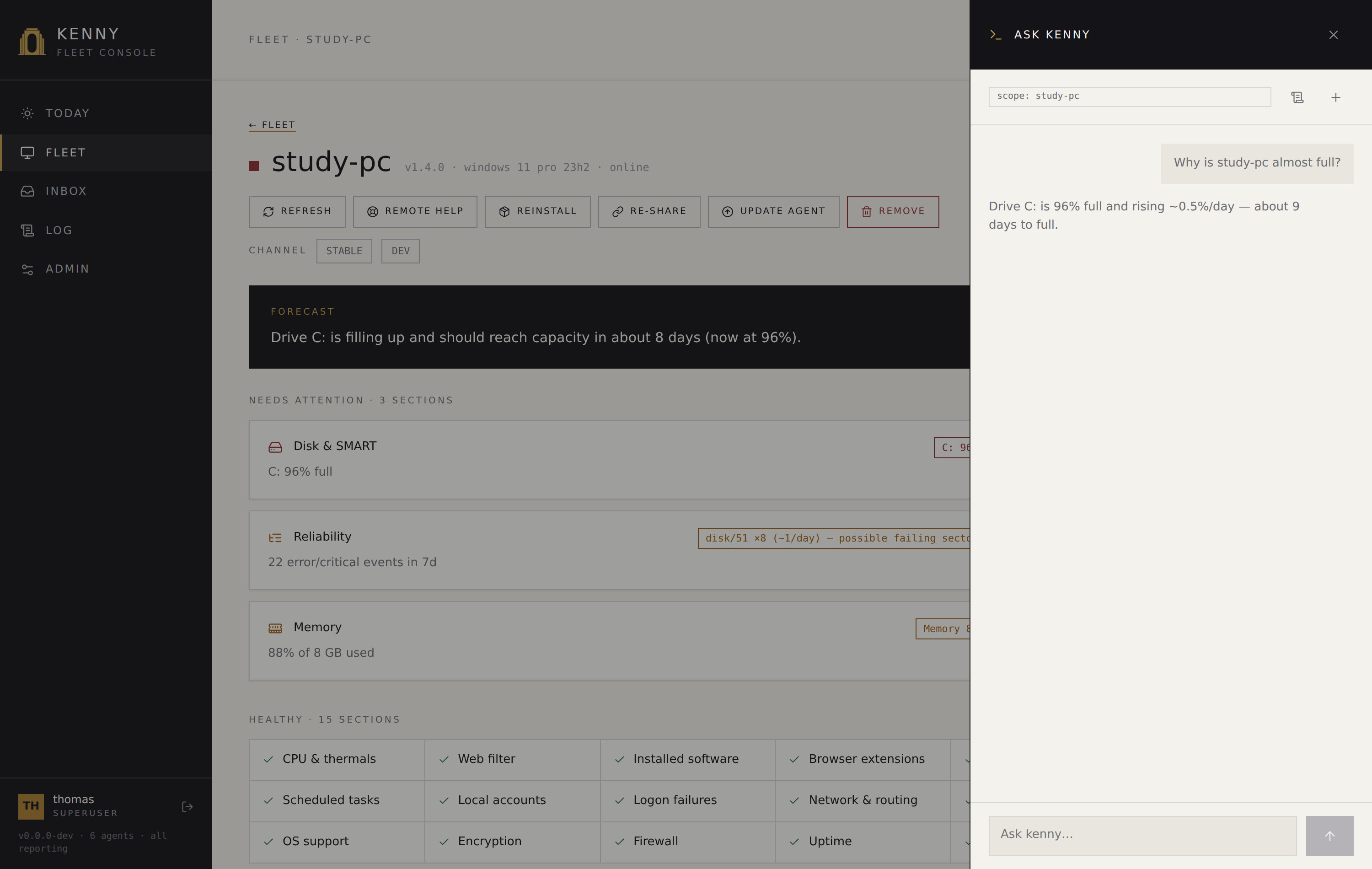 The confirm-gate pausing a
 winget_update until the operator approves. It is a
standard_change — which the Discord surface runs on its own, and Ask kenny still
confirms. That difference is the point of the table above: the tier describes the tool, the
surface decides the gate.
Alongside the tier, two independent flags apply to a handful of tools regardless of which surface calls them:
- Privacy-sensitive (
screen_capture,remotehelp_start,fs_read,web_activity_query) — invoking the tool touches someone's privacy, or needs the person at the keyboard to know. On the Discord surface this needs the affected person's consent, separately from whether the caller is authorized — see ITSM: operator approval vs. user consent. - Redacted output (
screen_capture,fs_read,fs_search,web_activity_query,diag_eventlog) — the result carries screen pixels, file contents, event-log text or browsing history, and must never be echoed verbatim to an external chat surface; Discord summarises and links to the ticket in the authenticated dashboard instead.
The three-tier classification lives in one place, so it is worth being precise about the other controls that also gate a call, independent of tier or surface:
| Control | Where it lives | What it does |
|---|---|---|
| Role & host scope (ADR-0033) | Auth middleware + tool layer (server) | The access token — an OAuth token (ADR-0037) or a personal access token — identifies a user; a user-role caller only sees/targets its assigned hosts (select_agent, agent_*, forwarders, and list_agents/fleet_overview are scope-filtered), and parental-controls mutation tools require operator+. The legacy shared token acts as a superuser. |
| Capability profile (ADR-0047) | Tool schemas + dispatch (server) | An optional, named per-account tool allowlist that only ever narrows what the role already allows — checked twice: the tool is not offered to the model, and dispatch refuses it again. See ITSM: capability profiles. |
| Agent-side safety guard (ADR-0019) | Compiled into the agent | Deterministically refuses individually catastrophic calls (disk wipes, shadow-copy deletion, event-log clearing, Defender disable, sensitive-path fs_*, unlisted agent_update hosts) regardless of operator approval — and it cannot be turned off from the server. |
| Shell execution mode (ADR-0064) | Set on the server, enforced at the agent | What powershell_exec and shell_exec may run fleet-wide: unrestricted (the default), allowlist (only commands that match a declared rule in full), or off. Deny rules are checked first either way, so an allow rule can never lift one. Set by a superuser in Admin → Shell policy. |
| OS guard | Server (forwarder) | Refuses powershell_exec/shell_exec for the wrong agent OS — e.g. shell_exec on a Windows agent — before ever forwarding, naming the correct tool. |
| Local kill-switch (ADR-0011) | Agent + tray, at the PC | The person at the PC turns all state-changing tools off. Forwarded calls then return error.code = "disabled"; telemetry and read-only tools keep working. |
A raw MCP client is not confirm-gated
The confirm-gate is a property of the Ask kenny overlay loop, not of the server's tool
surface. A raw external MCP client (e.g. Claude Desktop) pointed at /mcp is not
confirm-gated by the server — every tier runs. The agent-side guard and the local
kill-switch still apply — they are enforced at the agent, the boundary that actually
runs the command — so they hold no matter who calls the tool. It also must name its
target explicitly: every forwarded call takes its own agent_id (see the note above),
so a raw MCP client can never fall back onto whatever host another concurrent session
happened to select.
Capability tools
Names are exactly as they appear on the wire, over MCP, and in the chat. The Arguments
column lists only each tool's own parameters — every capability tool additionally takes
agent_id naming the target host (required over MCP; optional in the Ask kenny overlay, where
it overrides the session's selection for one call). agent_id is routing metadata the
server consumes and never puts on the wire (ADR-0038).
Shell
powershell_exec and shell_exec are OS-scoped mirrors: each runs only on its matching
agent OS (Windows / Linux+macOS) and is unsupported on the other. The server's OS
guard (see the confirm-gate table above) refuses to forward the wrong one before it ever
reaches the agent.
| Tool | Arguments | Tier |
|---|---|---|
powershell_exec |
script, timeout_s |
normal_change |
shell_exec |
command, timeout_s |
normal_change |
Both are governed by the fleet's shell execution mode
(ADR-0064). Out of the box the mode is
unrestricted and they behave as they always have. Under allowlist a command runs only
if it matches a declared allow rule in its entirety — a rule of uname -a does not admit
uname -a; rm -rf / — and under off neither tool runs at all. A refusal comes back as
error.code = "blocked", the same code the safety guard uses.
A new server ships a default allow list, restorable from Admin → Shell policy, so switching to
allowlist does not start from nothing. It admits read-only diagnostics — system, load,
storage, services and logs, network state and reachability, packages, accounts, firewall
state, containers — and one remediation per OS: restarting a service by exact name. Commands
that read files are left to fs_read and fs_list, whose path guard a shell would bypass,
and the rules keep out what turns a diagnostic into something else: command chaining,
redirection, variables and subexpressions, interpreters, pipes into anything but filters like
grep, Select-Object or Where-Object with a plain comparison, and the forms of a read-only
tool that write, delete or run forever (journalctl --vacuum-*, dmesg -c, ping -t).
The mode is a defence against an abused or prompt-injected credential and against accidental destruction. It is not a sandbox: it cannot help against a compromised kenny server, which is what pushes the mode, or against someone who is already root on the managed host.
Files
| Tool | Arguments | Tier |
|---|---|---|
fs_list |
path |
read_only |
fs_search |
root, pattern |
read_only (redacted output) |
fs_read |
path |
read_only (privacy-sensitive, redacted output) |
fs_disk_usage |
— | read_only |
Packages
| Tool | Arguments | Tier |
|---|---|---|
winget_list |
— | read_only |
winget_install |
id |
normal_change |
winget_uninstall |
id |
normal_change |
winget_update |
id? |
standard_change — updating an already-installed package is the routine, reversible half of the package family |
Diagnostics
| Tool | Arguments | Tier |
|---|---|---|
diag_processes |
— | read_only |
diag_services |
filter? |
read_only |
diag_eventlog |
log, count |
read_only (redacted output) |
diag_autostart |
— | read_only |
On Windows, diag_services, diag_eventlog and diag_autostart each run one CIM or
event-log query that the agent stops after 50 s; the server waits 90 s for these three.
A query that runs out of time comes back as a timeout error naming the query, so a
slow, busy machine is not mistaken for one that returned nothing.
Network
| Tool | Arguments | Tier |
|---|---|---|
net_config |
— | read_only |
net_dns_flush |
— | standard_change |
net_adapter_reset |
name |
standard_change |
Screen
| Tool | Arguments | Tier |
|---|---|---|
screen_capture |
— | read_only (privacy-sensitive, redacted output) |
Screenshots are captured in the interactive user session via the tray helper, not from the session-0 service (which would grab a black frame) — see ADR-0018.
Remote help
| Tool | Arguments | Tier |
|---|---|---|
remotehelp_status |
— | read_only |
remotehelp_start |
— | standard_change (privacy-sensitive) |
remotehelp_stop |
— | standard_change |
remotehelp_start launches Windows Quick Assist on the user's desktop; kenny acts as a
concierge, not the transport. A helper shares the 6-digit code and the person at the PC
must click Allow — the consent steps stay with the people
(ADR-0021). It is standard_change
and privacy-sensitive at once — the case where both of Discord's gates apply to the same
call; see ITSM: operator approval vs. user consent.
Telemetry
| Tool | Arguments | Tier |
|---|---|---|
telemetry_collect |
sections? |
read_only |
Agent management
| Tool | Arguments | Tier |
|---|---|---|
agent_update |
version, url, sha256 |
normal_change |
Parental controls
Registered on the agent when the web filter is wired up. See
parental-controls.md.
| Tool | Arguments | Tier |
|---|---|---|
webfilter_status |
— | read_only |
webfilter_apply |
domains, doh_policy, list_hash |
normal_change |
webfilter_clear |
— | normal_change |
Account governance
Who may sign in to the machine. principal is the account name — the same tool works
for a local, a Microsoft and a Linux account, on Windows and Linux hosts alike,
because below this layer neither operating system draws the distinctions above it. There
is no account_list: the inventory is the local_accounts telemetry section, refreshable
on demand with telemetry_collect — and it is also where each account publishes the verbs
it cannot perform, with a reason. All of these require the operator role and are
confirm-gated — and every one is normal_change: deciding who may sign in to a family PC
is never routine. See account-governance.md.
| Tool | Arguments | Tier |
|---|---|---|
account_set_enabled |
principal, enabled |
normal_change |
account_set_admin |
principal, admin |
normal_change |
account_set_logon_rights |
principal, deny (⊆ network, remote_interactive) |
normal_change (network is Windows-only) |
account_create |
name, password, display_name?, admin? |
normal_change (local accounts only; no asymmetry on Linux) |
account_delete |
principal, remove_profile |
normal_change |
account_session_action |
principal, action (lock / logoff), warn_seconds? |
normal_change |
password_policy_set |
min_length?, max_age_days?, lockout_threshold? |
normal_change (accounts stored on the machine only) |
The agent refuses — with blocked, not overridable from the server — any call that would
disable, demote, delete or restrict the last enabled administrator, or delete a
built-in account.
Server-only orchestration tools
These read server state and are never forwarded. All are read-only.
| Tool | Arguments | Purpose |
|---|---|---|
list_agents |
— | Known agents with online state and rolled-up health: overall, flagged_sections (the incidents — warn/crit) and posture_sections (standing facts that never roll up; see the status model in telemetry.md). |
select_agent |
id |
Validate an agent id and set the Ask kenny overlay's default (advisory only over MCP — it does not route forwarded calls there; see the note above). |
fleet_overview |
— | Per-agent rolled-up health for the whole fleet, in the same shape as list_agents. |
agent_health |
id |
Per-section health for one agent: status, summary, reason, attention, tier (incident / posture / none), since and age_seconds (how long the section has held its current status, from the alert loop's state; null until it has seen it) and, where a rule has structured evidence, details (the reliability rule's per-pattern activity record, win_update's per-KB failures). |
agent_snapshot |
id, section? |
Latest stored telemetry snapshot (optionally one section). |
agent_availability |
id, days? |
When one host was reachable over the last days (1–30, default 7): online_pct (unknown time excluded), totals, outages (offline stretches ≥ 5 min, newest first), unknown_spans (the server itself was down), boots, and ledger_since (before it, stretches are reconstructed from telemetry arrival and marked approx). |
select_agent is withheld from the ticket surface
Every other server-only tool above is available wherever a ticket's profile allows
it; select_agent alone is filtered out there, because its only job is changing the
target — exactly what a ticket freezes at creation. See
ITSM: the lifecycle.
The Ask kenny overlay has two ticket tools of its own
(ADR-0063). Both are
read_only and neither writes a ticket: ticket_draft proposes one for the operator to
correct and open through the ordinary create route, which stays the only path that opens
a ticket, and ticket_find looks for one already on the queue. They are withheld from
every ticket-bound and unprompted-triage turn, and are not registered over MCP — a remote
client has no form for a draft to appear in.
| Tool | Arguments | Tier |
|---|---|---|
ticket_draft |
title, summary, agent_id? |
read_only (creates nothing) |
ticket_find |
agent_id? |
read_only |
A ticket opened from a draft records what the conversation had already checked: one
note row naming the successful read-only calls from that chat session, composed on the
server from the session itself rather than sent by the browser.
The server-side web-filter tools are also server-only. webfilter_get and
web_activity_query are read_only; webfilter_set and webfilter_push change state,
but at different tiers — webfilter_set changes what the server enforces,
webfilter_push only ships the already-configured list to the host, which is the routine
half.
| Tool | Arguments | Tier |
|---|---|---|
webfilter_get |
id |
read_only |
webfilter_set |
id, plus enforcement / history / config toggles / add_domain / remove_domain |
normal_change |
webfilter_push |
id |
standard_change |
web_activity_query |
id, hours?, flagged_only? |
read_only (privacy-sensitive, redacted output) |
Reliability alarm suppression (ADR-0041, issue #166) is server-only too: rules exclude a
(source, event_id) reliability event pattern from severity scoring, fleet-wide by default
or scoped to one host, without hiding its raw count. reliability_suppression_add/_remove
are normal_change (they hit the ADR-0009 confirm-gate in the Ask kenny overlay).
| Tool | Arguments | Tier |
|---|---|---|
reliability_suppression_list |
agent_id? |
read_only |
reliability_suppression_add |
event_id, source?, agent_id?, note? |
normal_change |
reliability_suppression_remove |
rule_id |
normal_change |
Auto-ticket rules are also server-only: they decide which alerts open a ticket
automatically, by default every genuine alert and nothing else. Operator+ on every one of
these, including the read — an alert-origin ticket is itself operator-only, so a scoped
user has no legitimate use for the rules that decide when one opens. ticket_rule_set
takes an event_type of health, offline, disk_forecast, hardware_forecast or
change, and a decision of open_all, open_crit or never.
| Tool | Arguments | Tier |
|---|---|---|
ticket_rule_list |
agent_id? |
read_only |
ticket_rule_set |
event_type, decision, section?, agent_id?, note? |
normal_change |
ticket_rule_remove |
rule_id |
normal_change |
Auditing
Every forwarded capability call is appended to the tool-call audit log, annotated
read-only vs state-changing (plus, additively, its tier), with its agent, timestamp, and
ok/error outcome. Read it in the dashboard's Log page, filtered to
the TOOLS chip. See dashboard.md.
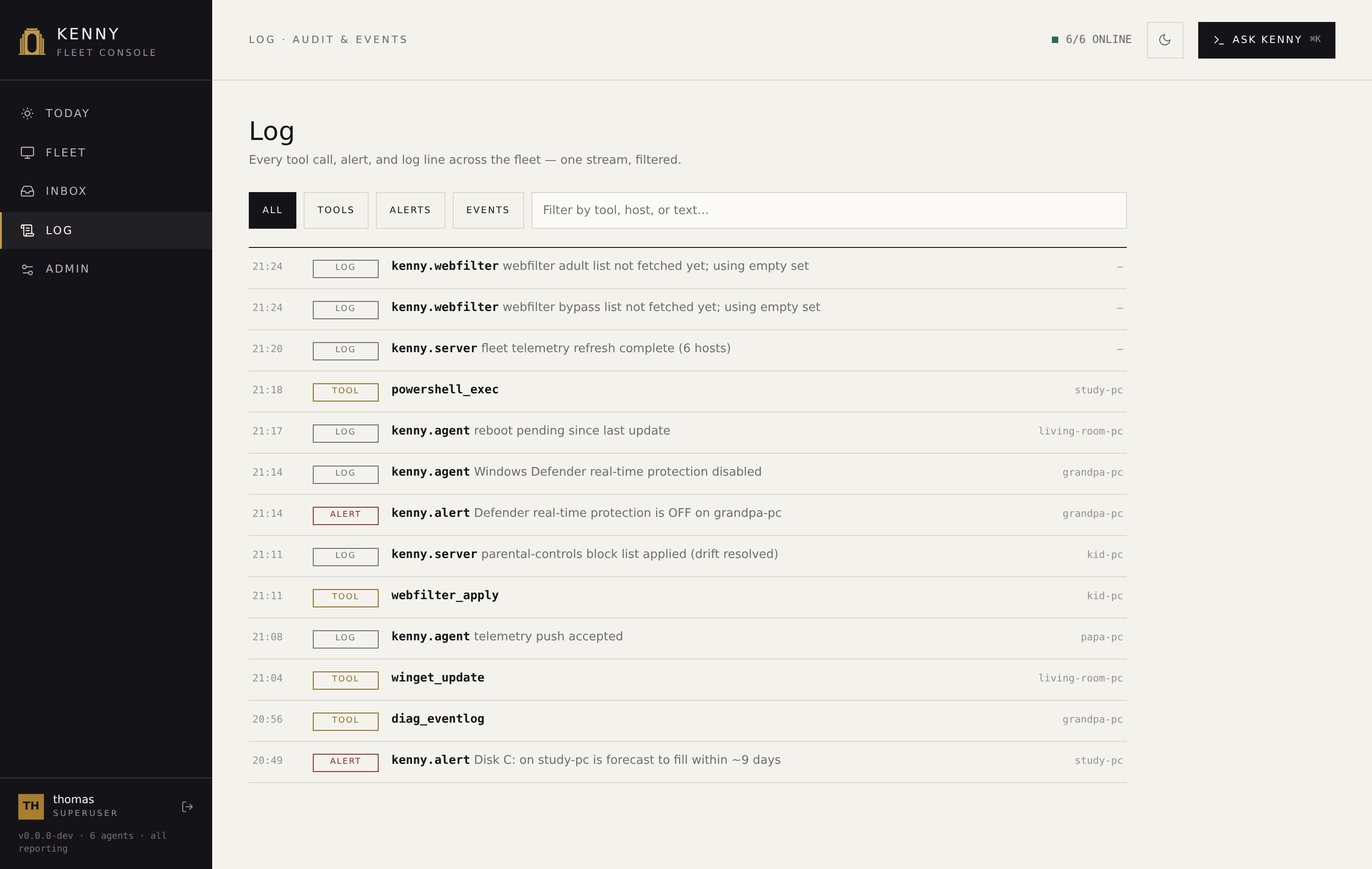 The Log page, filtered to tool calls, each tagged read-only or state-changing.
Tool naming
Tools use Anthropic-native snake_case names, identical to the wire-contract tool
catalog (ADR-0016). There is one canonical
identifier per tool across the contract, fixtures, MCP, the Ask kenny overlay, and the agent's
dispatch table — no boundary translation. The same names you see here appear over MCP and
in the chat.
See also
user-guide.md— the operator workflow around these tools.dashboard.md— Fleet, the host page, and the Log page.protocol.md— the authoritative agent⇄server wire contract.