
Moderation & guest uploads
Comment modes
Under Settings → Comments choose:
| Mode | Behaviour |
|---|---|
| Publish immediately | Comments appear right away; you can hide or delete them later |
| Approve first | New comments are pending until you approve them |
| Off | Nobody can comment; existing comments are hidden from guests |
Only signed-in users can comment. Comments are plain text, 1–1000 characters.
The moderation queue
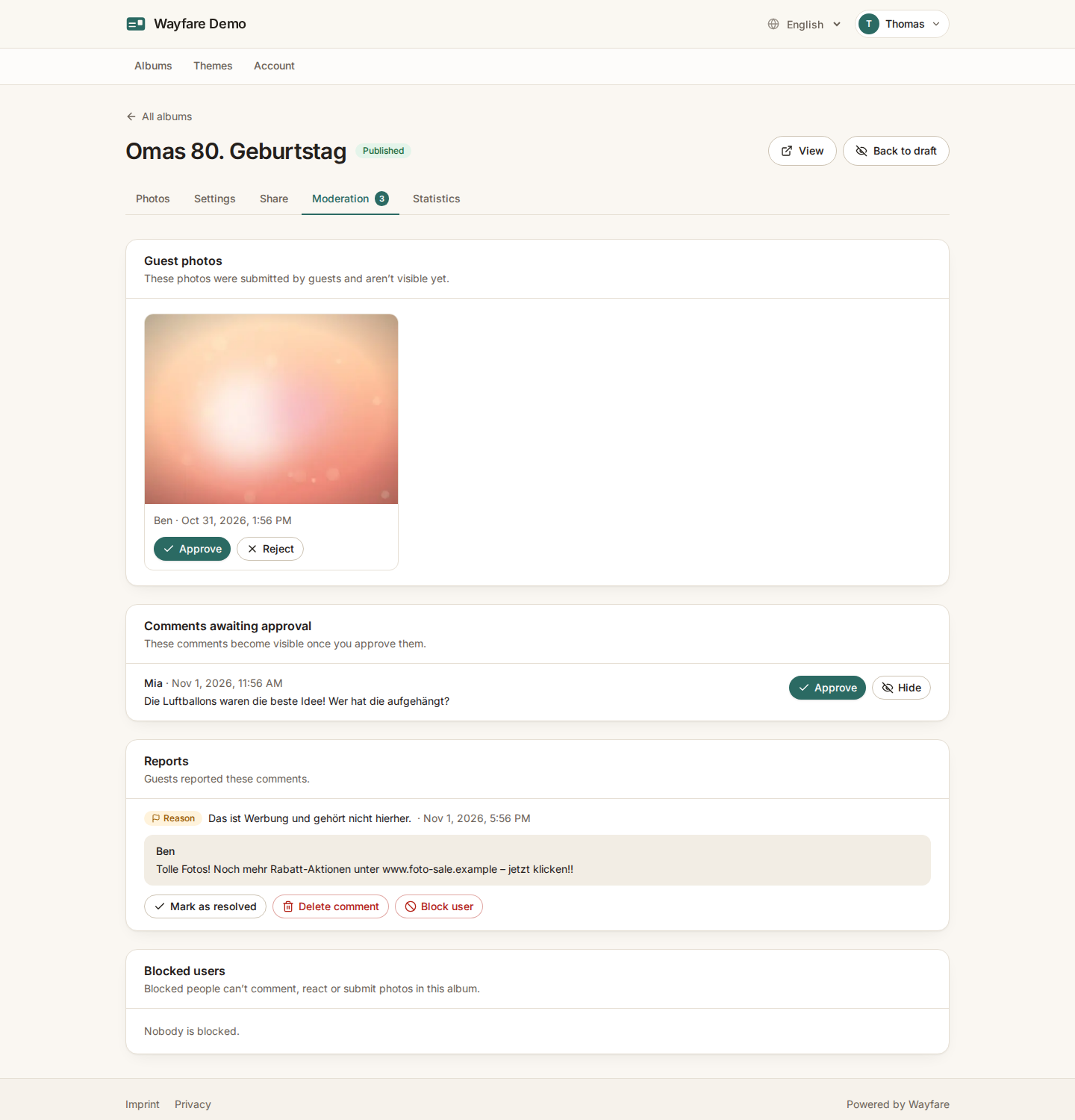
The Moderation tab lists:
- pending comments (in approve first mode) — approve or hide,
- reports — guests can report a comment; you see the reason and the comment and can hide/delete it and mark the report as resolved,
- pending guest photos — approve or reject.
Authors can delete their own comments, and you can delete any comment in your albums.
Blocking viewers
You can block a viewer for one album. Blocked users cannot comment, react or upload there, and their existing comments in that album are hidden. You can unblock at any time. Admins can additionally ban users instance-wide.
Guest uploads
Turn on Guest uploads in the settings and set a limit per guest. Signed-in guests then see an "Add your photos" button.
- Guest photos are never published immediately: they land in the queue as pending.
- You get a notification (see Notifications).
- Approved photos join the album; rejected ones are discarded.
This is perfect for weddings and parties where everyone took pictures.