
Photos
Upload
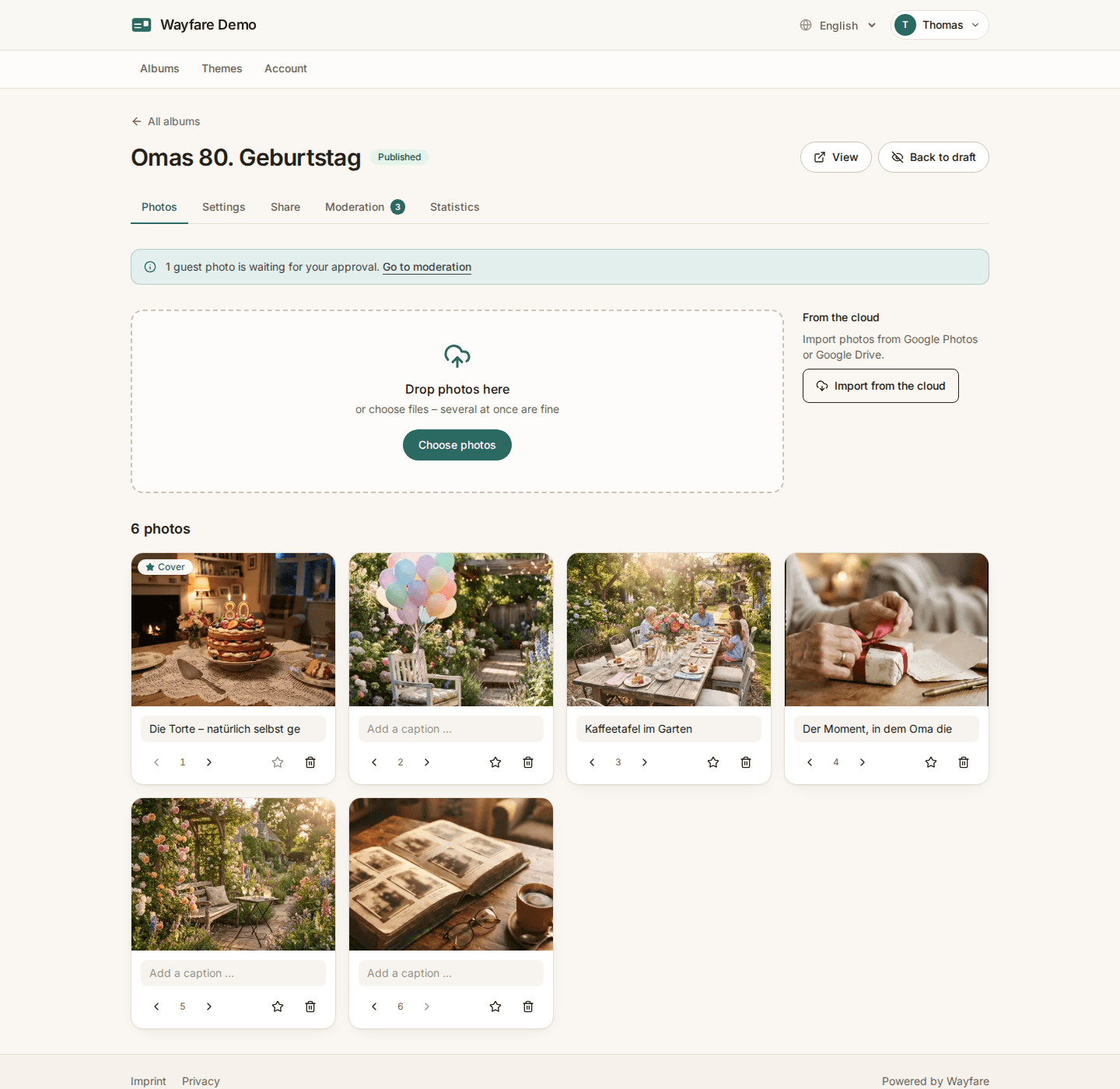
Open the album's Photos tab and drag photos into the upload area, or tap it to select files (on a phone you can pick from the gallery or take a photo). Uploads run in parallel with a progress bar.
- Supported are common image formats (JPEG, PNG, WebP, HEIC where the server can decode it).
- The instance has a maximum size per photo and a maximum number of photos per album — set by the admin. You get a clear message if a photo exceeds them.
- Photos you already imported from Google are skipped when you import them again.
What happens to your photos
For every photo Wayfare creates a small thumbnail and a display version (max. 1600 px). These versions have all metadata removed — including GPS location. The untouched original is kept and only handed out if you allow downloads.
Captions
Click a photo and add a caption. Captions are shown in the lightbox in the viewer.
Cover photo
Choose Set as cover on a photo. The cover is shown on the album's opening page, on the postcard front and on posters.
Order
Drag photos to reorder them. The order is saved automatically and is the order guests see.
Delete
Select one or more photos and delete them. Comments and reactions on a deleted photo are removed too. If the deleted photo was the cover, pick a new one.
Guest uploads
Photos uploaded by guests wait in the moderation queue until you approve or reject them — see Moderation.